
D-Robotics RDK X5
- Hosts listed by the manufacturer
- D-Robotics RDK X5
 Germany
 Netherlands
 Switzerland
 Austria
 Norway
 Finland
D-Robotics D-Robotics · Access and supporting accessories
RDK official audio development kit, you can choose 4 microphone or 6 microphone array, and press the USB or I2S access method to confirm the package.
Development platforms and accessories
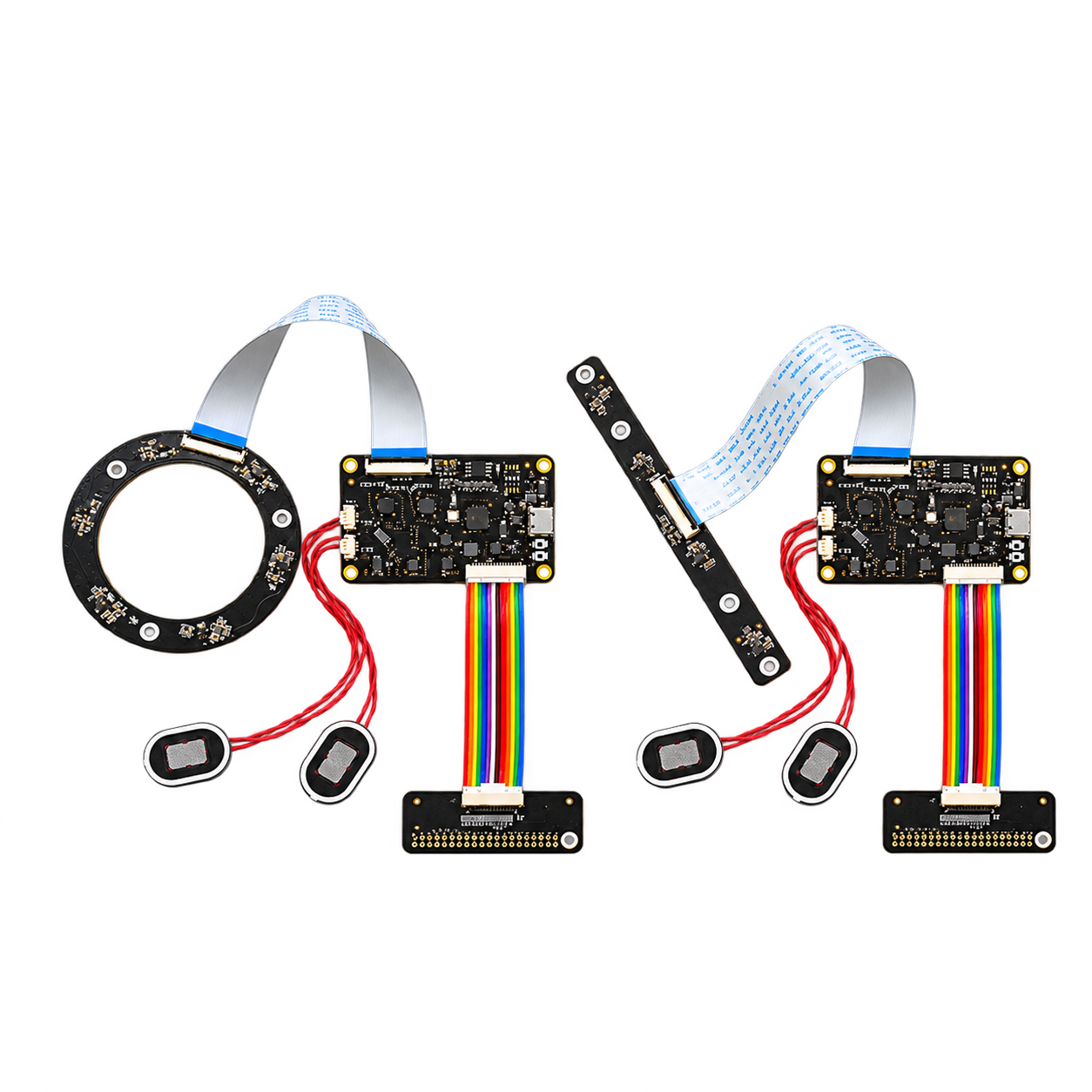
Official RDK accessories
Supported hosts and connections are listed in the manufacturer's documentation.
Switches the displayed specifications only. Purchase and inquiry configurations are selected separately.
| Microphone array configuration | 4-Mic Array / 6-Mic Array |
|---|---|
| Sampling and output format | 8 / 11.025 / 16 / 22.05 / 32 / 44.1 / 48 / 88.2 / 96 kHz |
| audio channel | Input and synchronous sampling channels: up to 6 microphone + 2 power loopback; 8 channel synchronous sampling
Output channel: 2 channel stereo playback |
| Applicable host | D-Robotics RDK X5 / D-Robotics RDK S100 / D-Robotics RDK S100P / D-Robotics RDK S600 |
| Data interface | USB UAC / I2S |
| Power supply | 4.5–5.5 V Conditions
|
| ADC/DAC and signal-to-noise ratio | DAC ES8156 × 1(SNR 110 dB);ADC ES7210 × 2(SNR 102 dB) |
|---|---|
| Connectors and cables | USB audio/flashing interface, audio digital interface, array interface; the adapter board provides 40-pin interface Conditions
|
| System & software scope | I²S: X5 RDK OS 3.5.0; S100/P 4.0.5-20260507; S600 5.1.0. USB: Standard UAC mode Conditions
|
| Synchronization | Single-channel I²S full-duplex requires the same sampling rate for sampling and playback; dual-channel I²S can use different sampling rates respectively. Conditions
|
| Operating environment | 0–65 °C |
| Microphone array configuration | 4-Mic Array / 6-Mic Array |
|---|---|
| Sampling and output format | 8 / 11.025 / 16 / 22.05 / 32 / 44.1 / 48 / 88.2 / 96 kHz |
| audio channel | Input and synchronous sampling channels: up to 6 microphone + 2 power loopback; 8 channel synchronous sampling
Output channel: 2 channel stereo playback |
| Applicable host | D-Robotics RDK X5 / D-Robotics RDK S100 / D-Robotics RDK S100P / D-Robotics RDK S600 |
| Data interface | USB UAC / I2S |
| Power supply | 4.5–5.5 V Conditions
|
| ADC/DAC and signal-to-noise ratio | DAC ES8156 × 1(SNR 110 dB);ADC ES7210 × 2(SNR 102 dB) |
|---|---|
| Connectors and cables | USB audio/flashing interface, audio digital interface, array interface; the adapter board provides 40-pin interface Conditions
|
| System & software scope | I²S: X5 RDK OS 3.5.0; S100/P 4.0.5-20260507; S600 5.1.0. USB: Standard UAC mode Conditions
|
| Synchronization | Single-channel I²S full-duplex requires the same sampling rate for sampling and playback; dual-channel I²S can use different sampling rates respectively. Conditions
|
| Operating environment | 0–65 °C |
| Microphone array configuration | 4-Mic Array / 6-Mic Array |
|---|---|
| Sampling and output format | 8 / 11.025 / 16 / 22.05 / 32 / 44.1 / 48 / 88.2 / 96 kHz |
| audio channel | Input and synchronous sampling channels: up to 6 microphone + 2 power loopback; 8 channel synchronous sampling
Output channel: 2 channel stereo playback |
| Applicable host | D-Robotics RDK X5 / D-Robotics RDK S100 / D-Robotics RDK S100P / D-Robotics RDK S600 |
| Data interface | USB UAC / I2S |
| Power supply | 4.5–5.5 V Conditions
|
| ADC/DAC and signal-to-noise ratio | DAC ES8156 × 1(SNR 110 dB);ADC ES7210 × 2(SNR 102 dB) |
|---|---|
| Connectors and cables | USB audio/flashing interface, audio digital interface, array interface; the adapter board provides 40-pin interface Conditions
|
| System & software scope | I²S: X5 RDK OS 3.5.0; S100/P 4.0.5-20260507; S600 5.1.0. USB: Standard UAC mode Conditions
|
| Synchronization | Single-channel I²S full-duplex requires the same sampling rate for sampling and playback; dual-channel I²S can use different sampling rates respectively. Conditions
|
| Operating environment | 0–65 °C |
Included items, options, wiring harnesses and mounting hardware are confirmed according to the selected model and system configuration.
official 4 microphone array configuration; sales package, interface mode, cable and speaker range need to be confirmed by Inquiry.
official 6 microphone array configuration; sales package, interface mode, cable and speaker range need to be confirmed by Inquiry.
When using these documents, please check the product model, hardware configuration and document version.